PHILLIPS MAGNAVOX VRA-621AT21 Vhs Vcr Digital Usb Capture Philips Av Hdmi Adapter
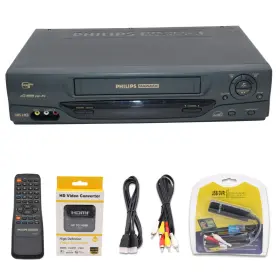
( Brand: Phillips Magnavox ), ( Manufacturer Part Number: VRA-621AT21 ), ( Bundle Description: Usb 2.0 Converter Capture, Av To Hdmi Converter Adapter, Remote ), ( Custom Bundle: Yes ), ( Playable Media: Vhs ), ( Type: Vhs Vcr Player ), ( Unit Type: Unit ), ( Region Code: Ntsc ), ( Connectivity: Composite Rca, Rf Coaxial ), ( Features: Vhs Playback ), ( Vhs To Digital Conversion: Via Included Usb Capture ), ( Country Of Origin: China )
Review PHILLIPS MAGNAVOX Vhs Vcr Convert To Digital Usb Capture Av hdmi Adapter
The Phillips Magnavox VRA-621AT21 VHS VCR Digital USB Capture AV-HDMI Adapter is a versatile and innovative solution for digitizing your old VHS tapes into digital formats. This adapter is specifically designed to work with the Phillips Magnavox VRA6210 VHS VCR, allowing you to record your VHS content directly to a digital file or stream it live to your HDTV or computer.
The VRA-621AT21 is equipped with advanced video and audio conversion technology that ensures high-quality digitization. It supports both PAL and NTSC video formats and can convert the analog signal from your VHS tape into a clear, crisp digital signal. The adapter also features built-in upscaling technology to enhance the resolution of your VHS content up to 1080p for viewing on modern HDTVs.
The VRA-621AT21 comes with a USB output, making it easy to connect to your computer or laptop to capture and save your VHS content as digital files. It also supports real-time streaming via HDMI output, allowing you to watch your digitized VHS content on your HDTV or projector in real-time without the need for a computer.
This adapter also includes an easy-to-use remote control, allowing you to operate the VCR and the digitization process from the comfort of your couch. Additionally, it comes with software for your computer that provides additional features, such as the ability to edit and enhance your digitized content, and create custom menus and chapters.
The Phillips Magnavox VRA-621AT21 VHS VCR Digital USB Capture AV-HDMI Adapter is a must-have for anyone looking to preserve their VHS collection in a digital format. With its advanced video and audio conversion technology, easy-to-use interface, and versatile output options, it is an essential tool for anyone looking to digitize their VHS tapes and bring their cherished memories into the modern age.
The Phillips Magnavox VRA-621AT21 VHS VCR with Digital USB Capture and AV-HDMI Adapter is a multifunctional device designed to allow users to record VHS tapes onto a digital format and output the content in high definition through HDMI. Here are some pros and cons of purchasing this device:
Pros:1. Preservation of Old Tapes: With the growing obsolescence of VHS tapes, the Phillips Magnavox VRA-621AT21 VHS VCR offers a solution to preserve cherished memories on a more modern format.
2. Easy-to-Use Interface: The device comes with an intuitive interface, making it easy for users to record, edit, and save their VHS content onto a digital format.
3. High-Definition Output: The AV-HDMI adapter ensures that the recorded content is output in high definition, providing a clear and crisp viewing experience.
4. USB Capture: The USB capture feature enables users to easily transfer their recorded content onto a computer or external hard drive for backup and editing purposes.
5. Built-in Speakers: The device comes with built-in speakers, providing an additional convenience for users who do not have external audio systems.
Cons:1. Limited Connectivity: The device does not offer Wi-Fi connectivity, which may be a drawback for some users who prefer wirelessly transferring their content.
2. Compatibility Issues: Some users have reported compatibility issues with certain VHS tapes, leading to poor quality recordings.
3. Size: The device is relatively large compared to other modern media players, which may make it less portable.
4. Price: Compared to some other VHS-to-digital solutions, the Phillips Magnavox VRA-621AT21 VHS VCR with Digital USB Capture and AV-HDMI Adapter may be more expensive.
In conclusion, the Phillips Magnavox VRA-621AT21 VHS VCR with Digital USB Capture and AV-HDMI Adapter offers a convenient and high-quality solution for preserving cherished VHS memories on a digital format. While there are some limitations, such as the lack of Wi-Fi connectivity and size, the benefits, such as easy-to-use interface, high-definition output, USB capture, and built-in speakers, outweigh the drawbacks. If you have a collection of VHS tapes and want to preserve them in a modern format, this device is a solid investment. However, if you are looking for a more cost-effective solution or prefer a more portable device, there may be other options to consider. Ultimately, the decision to purchase the Phillips Magnavox VRA-621AT21 VHS VCR depends on your individual needs and preferences.
Details:
AV to HDMI Converter Adapter Play VHS on Modern TVs. Connects your VCR to a modern TV with HDMI ports. VHS to Digital Conversion Easily convert your VHS tapes into digital files using the USB 2.0 Audio Video Capture Converter and a VCR player. Tape Condition Matters Older, damaged, or moldy tapes can affect playback and may harm your VCR.
Simple Plug Play Setup No sound card required ; capture both video and audio directly to your Windows PC. VHS to Digital File DVD Conversion Bundle Preserve Your Memories. Avoid using USB hubs to prevent dropped frames and quality loss. Preserve your VHS memories today.
They donor work together. Condition Requirements Only items in original condition are eligible for return no damage, missing parts, or excessive use. Follow the user manual for setup instructions.
USB Connection Best Practice Plug the 2.0 Capture Converter directly into your computer'subs port. Step 3: Insert blank DVD, create a new DVD project, and burn your video. You cause free software like DVD Flick to create DVDs. Order now and start digitizing your collection.
Step 2: Use a DVD burner to create DVD from the saved digital file. VHS to DVD Conversion Made Easy. Shipping Information. Ideal for New TVs Watch your old VHS tapes on modern without losing picture quality.
Software Note: No DVD-burning software is included. Important Tips for Best Performance. Convert your old VHS tapes into digital file sand DVDs effortlessly with this complete conversion package. Capture Software Advice If your computer lacks a CD-ROM drive or the provided software does not work, download OBS Studio free online.
Multiple Input Options Supports RCA composite and S-Video with stereo audio connections.
part #: vra621at21 prices
- $9.95-$21.99
specifications oldievcrs:
- brand: Phillips Magnavox
- mpn: Vra-621at21
- bundle description: Usb 2.0 Converter Capture, Av To Hdmi Converter Adapter, Remote
- custom bundle: Yes
- playable media: Vhs
- type: Vhs Vcr Player
- unit type: Unit
- region code: Ntsc
- connectivity: Composite Rca, Rf Coaxial
- features: Vhs Playback
- vhs to digital conversion: Via Included Usb Capture
- country of origin: China
general oldievcrs:
- Vintage Electronics > Vintage Audio Video > VCRs
- condition: Used
seller oldievcrs:
- city: Redmond, Washington
- # reviews: 1004
- rating: 99.5%
offer oldievcrs:
- availability: In Stock
- sold: 0
- options: Ship-to-home
- started: March 18, 2026
- quantity: 1
payments oldievcrs:
- credit card: Discover
- wallet: Paypal
- other
shipping oldievcrs:
- type: Fixed
- carrier: FedEx, USPS, UPS
- cost: $0.00
- transit: 3-7 Days
- class: Standard
- service: FedEx Ground / FedEx Home Delivery, USPS Ground Advantage, UPS Ground
returns oldievcrs:
- time: 30 Days
- policy: Returns Accepted
- method: Money back
- paid by: Seller
Phillips Magnavox VRA-621AT21 Is Similar To:
- Philips Vr620cat21 Phillips Vcr 4 Head Hifi Vhs Video Cassette Recorder Player (32.1% similar) Shipped with USPS ground advantage. Condition is used. Phillips VR620CAT21 vcr 4 head WiFi vhs video cassette recorder player...(May 22nd, 2024)
- Phillips Vrb411at24 Philips Video Cassette Recorder Vhs Hq 4 Head Vcr Please Read (35.9% similar) Sold for parts, as is or repair. Fast shipping. Tested and powers on but not reading vhs tapes keep turning off. Has crack in top portion as shown pictures...(May 29th, 2024)
- Philips Magnavox Vrz360 Phillips Vcr Plus 4 Head Vhs Player Tested No Remote Eb-14742 (41.4% similar) Please look carefully at the photos to verify condition of item. Please review all photos and ask any questions. Shipping: I will combine shipping whenever possible if more than one item is purchased. Refer for photos. Comes with 2 blank vhs tapes sealed. Phillips Magnavox VRZ360 vcr...(June 7th, 2024)
- Magnavox Vr401bmg23 Phillips Vcr 4-head Vhs Tape Player No Remote Tested (37.2% similar) Please feel free to reach out with questions. All is shown in the pictures, along with measurements. I sell a variety of new, used and vintage items. Tested working-will not come with remote or av cord, has some white paint speckles on the top...(June 19th, 2024)
- Magnavox Vra231at23 Phillips Vcr Plus 4 Head Model No Remote Tested Working (43.5% similar) While it does not come with a remote, is still fully functional and ready for use. This vcr has been tested and is confirmed to be in working condition. The brand, Magnavox, is well-known for their high-quality electronics. This Phillips Magnavox vcr plus 4 head model VRA231AT23 is a great...(July 3rd, 2024)
- Philips Dpv3150v Phillips Vhs Vcr Dvd Combo Unit Tested Works No Remote 4head (33.5% similar) With its 4 head technology, you can enjoy high-quality video playback and the unit comes with a sleek compact design that will fit nicely in any entertainment center. It is categorized under consumer electronics, vintage audio video, and VCR's. It is branded by Philips and plays only vhs tapes...(July 12th, 2024)
- Phillips Vrb611at21 Magnovox Vcr Video Cassette Recorder Vhs Player Tested Works (37.8% similar) Phillips Magnavox vcr video cassette recorder vhs player VRB611AT21 tested...(July 23rd, 2024)
- Magnavox Vrz263at21 Phillips 4-head Vcr Plus No Remote Tested And Working (40.8% similar) This item is in used condition. Any noticed flaws are pictured, so please be advised and see photos carefully before purchase...(July 24th, 2024)
- Philips Vr1010b Phillips Super Vhs Et Vcr Player W Remote Cables Tested Working (39.3% similar) Phillips VR1010B super vhs ET vcr player w remote cables tested working...(August 8th, 2024)
- Magnavox 602508773228 Phillips 4 Head Hi-fi Vcr Plus Vhs Tape Player With Remote And Cables (36.6% similar) The device has four heads and is made in an unknown country/region of manufacture. This vintage electronics piece comes with a remote and cables, making it perfect addition to your collection. The type of the device is vcr plus, and it perfect for those who love to play their old vhs tapes...(August 18th, 2024)
- Phillips Dvp3050 Dvp 3050 Dvd vcr Player Powers On For Repair Or Parts (28.6% similar) Vcr eats up the tapes, brand: Phillips, item: DVD/vcr combo, unit powers on; DVD player works, player measurements: please reference photos. Condition: repair DVD works...(August 19th, 2024)